SMS Marketing Automation Strategies for eCommerce: Flows, Tips, and Best PracticesView as Markdown
eCommerce brands can automate SMS flows for welcome messages, abandoned cart recovery, shipping updates, win-backs, loyalty campaigns, and personalized customer journeys.
- SMS automation sends messages in response to customer actions, purchase activity, and defined timing rules.
- Welcome, abandoned-cart, post-purchase, win-back, and loyalty flows provide a practical foundation for eCommerce automation.
- Segmentation and personalization help each message reflect the customer’s interests, history, and stage in the buying journey.
- Frequency caps, exit conditions, and consent controls reduce unnecessary sends while supporting compliance and list health.
- Measuring each flow by its intended outcome helps you improve conversions, revenue, retention, and customer response over time.
What Is SMS Marketing Automation?
SMS marketing automation uses predefined triggers to send texts when a customer completes an action or meets a specific condition. An automated workflow might begin when someone joins your list, adds an item to a cart, completes a purchase, passes a loyalty threshold, or has not made a purchase within a specific period. Once active, the platform sends messages, applies delays, and checks customer activity to determine the next step.
SMS Automation vs. Scheduled Broadcasts vs. Manual Sends
SMS automation, scheduled broadcasts, and manual sends share similar goals, but they differ in how the message is initiated and what kind of ongoing effort they require.
| How it works | Level of ongoing effort | Best used for | Example | |
|---|---|---|---|---|
| SMS automation | A workflow starts for each customer when they meet a defined trigger or condition. | Low after the workflow is built and tested | Lifecycle communication that depends on individual behavior or timing | A cart reminder sent 45 minutes after a shopper leaves checkout |
| Scheduled broadcast | One message is prepared in advance and sent to a selected list or segment at a set time. | Moderate; each campaign must be planned and scheduled | Promotions or announcements tied to the brand’s calendar | A flash-sale message sent to loyalty members at noon |
| Manual send | A team member creates and sends a message in response to an immediate need. | High; each message requires direct, manual action | One-off updates, direct replies, or situations that require human judgment | A support representative sending an order update to one customer |
Most eCommerce SMS programs use all three. Automation handles recurring customer journeys, scheduled broadcasts support coordinated promotions, and manual sends cover situations that need direct attention.
The Role of Triggers in SMS Automation
A trigger is the event or condition that starts an automated workflow. Common eCommerce SMS triggers include:
- A new subscriber opt-in
- A first purchase
- An abandoned cart or checkout
- An order confirmation
- A shipping update
- A delivery scan
- A scheduled review request
- A loyalty points milestone
- A defined period since the last purchase
Additional Workflow Controls
Triggers can be combined with several workflow controls that determine what happens after the initial message. These controls help the workflow respond to customer behavior while limiting irrelevant or repetitive messages that could lead to recipient opt-outs:
- Delays: This type of control pauses the workflow for a set period before the next step. For example, a cart recovery flow might wait several hours before checking whether the customer completed the purchase.
- Filters: A filter limits who continues through the sequence based on specific criteria, such as purchase status, order value, location, or recent engagement.
- Branching rules: These send customers down different paths, determined by the actions they take. Someone who clicked a cart link might receive a different follow-up when compared to someone who did not engage with the reminder.
Essential eCommerce SMS Automation Flows
A strong eCommerce SMS automation program should start with a few core workflows that address the most valuable customer actions. Building these foundations first also makes performance easier to monitor.
Welcome and Onboarding Series
A welcome flow begins after a customer provides valid consent to receive texts. Because the subscriber has just taken an active step toward your brand, the first message should arrive promptly and deliver whatever was promised during signup, such as a discount, product update, or early-access benefit.
A simple welcome series might include:
- Send the initial benefit immediately: Confirm the subscription, identify your business, and provide the promised offer or information.
- Help the subscriber explore: Follow up 24 to 48 hours later with a popular category, useful buying guide, or group of best-selling products.
- Encourage a first purchase: Send a final message several days later with a low-friction next step, such as browsing a new collection or using the original signup offer.
Example:
- “Hi {first_name}, welcome to {brand}. Use {offer_code} for {offer} on your first order: {shop_link}. Reply STOP to opt out.”
Customers who purchase during the sequence should exit the remaining welcome messages and move into a post-purchase flow. Because 71% of consumers subscribe to business texts before making a purchase, the welcome series should support product discovery as well as conversion.
Abandoned Cart Recovery
An abandoned-cart flow begins when an opted-in shopper adds merchandise to a cart but leaves without completing the purchase. The goal is to make returning easy while avoiding assumptions about why the person stopped.
An effective sequence may include:
- Send a reminder within 30–60 minutes: Include the product name and a direct link to the saved cart.
- Follow up the next day: Address a likely concern, such as shipping, sizing, returns, or product availability.
- Send a final message after 48–72 hours: Use a limited incentive only when it supports your margins and the shopper has not already converted.
Example:
- “{first_name}, your {product_name} is still in your {brand} cart. Continue where you left off: {cart_link}. Reply STOP to opt out.”
It’s useful to recognize that the first text does not always need a discount. A customer may have been distracted, encountered a technical issue, or wanted additional time to consider the purchase. Starting with a straightforward reminder gives the shopper another opportunity to act without creating an expectation of an immediate coupon..
Every message should link directly to the saved cart rather than a homepage or general category. Reducing the number of steps between the reminder and checkout is one of the most useful improvements you can make to the flow.
Post-Purchase and Shipping Notifications
Post-purchase automation covers the period from order confirmation through delivery. Shoppers are especially attentive during this stage because they want to know whether the purchase was processed and when the order will arrive.
A typical sequence includes:
- Order confirmation: The message confirms that the order was received and provides an order number or receipt link.
- Shipping notification: The customer receives tracking information when the package leaves the warehouse.
- Out-for-delivery alert: The message lets the customer know the package is expected that day.
- Delivery confirmation: The workflow confirms arrival and provides a support option if the order cannot be located. EZ Texting reports that delivery notification texts reduce inbound support contacts by 40–60% and improve customer satisfaction scores by 12–18 points among logistics and shipping businesses.
- Review request: The customer receives a feedback request after having enough time to evaluate the product. Forty-seven percent of customers report sharing feedback through SMS.
These messages should remain service-oriented while the order is in transit. Promotional follow-ups can begin later, once the customer has received the product and had an opportunity to use it. Timely shipping updates can also reduce uncertainty after purchase by answering common questions before customers need to contact support.
Win-Back and Reengagement Flows
Forty-nine percent of consumers say they purchase more often after receiving texts from businesses. A win-back flow reengages previous customers with timely messages based on their purchase history, helping you encourage another order without relying on broad, untargeted promotions.
A concise win-back sequence typically consists of two messages:
- Reconnect with a relevant recommendation: Refer to the customer’s previous category, purchase, or demonstrated preference.
- Add a time-limited reason to return: Follow up five to seven days later with an offer when the customer remains inactive.
Examples:
- “Hi {first_name}, ready to revisit {product_category}? See recommendations based on your last purchase: {shop_link}. Reply STOP to opt out.”
- “Your {offer} from {brand} ends {expiration_date}. Use {offer_code} on your next order: {shop_link}. Reply STOP to opt out.”
Avoid placing every lapsed customer into one generic flow. A first-time buyer, frequent customer, and loyalty member have different histories with your business. Their messages should reflect those distinctions.
Customers who respond to a win-back SMS are 30–50% more likely to make a repeat purchase than those reengaged via email alone.
Personalization and Segmentation in Automated SMS
Automation is effective at distributing messages, but distribution alone does not make those messages useful. Sending the same workflow to every subscriber ignores differences in product interest, spending behavior, order history, and current intent. Segmentation supplies the context needed to determine who should enter a flow.
Building Segments for Automation
Valuable eCommerce segmentation criteria include:
- Purchase status: Separate new subscribers, first-time buyers, and repeat customers so each group enters the appropriate flow.
- Product interest: Use browsing, purchase, and signup data to organize customers around the categories they are most likely to care about.
- Average order value: Group customers by typical spend to support more relevant offers and recommendations.
- Loyalty status: Tailor messages according to membership tier, reward eligibility, or points balance.
- Time since purchase: Set replenishment, reengagement, and win-back timing according to how long it has been since the customer last ordered.
- Location: Schedule sends by local time zone and account for regional product availability, events, or delivery conditions.
Segments should update as customer behavior changes. A second purchase, for example, can move someone from a first-time buyer group into a repeat-customer segment, ensuring future automations reflect their updated customer status.
You can also narrow segments based on intent. Repeated product views, category exploration, cart activity, and campaign clicks provide stronger signals than a single visit. Product-specific messages, such as back-in-stock alerts, should go only to customers who showed interest in that item or variant.
Dynamic Content and Personalization Variables
Personalization variables are fields that insert customer-specific information when a message is sent. Depending on the data available, a template might include:
- First name: The message addresses the subscriber directly when accurate name data is available.
- Product name: The text references an item the customer purchased, viewed, or left in a cart.
- Loyalty balance: The customer sees how many points or rewards are currently available.
- Recommended category: The message directs the recipient toward products related to previous activity.
- Offer expiration: The text displays the correct deadline for an active promotion.
Remember that accuracy is more important than the number of variables. Incorrect names, outdated product references, and expired offers can make an automated message appear unreliable. Use fallback text for missing fields, and test the workflow before sending it to customers.
Promotional SMS Automation Strategies
Promotional automation adds systematic follow-up to scheduled campaigns, helping you send later messages according to whether each recipient clicked or purchased.
Flash Sales and Limited-Time Offers
A flash-sale workflow can begin with a launch message sent to a relevant segment, followed by a reminder several hours before the promotion ends. Before sending that second message, the platform should check who has already purchased and remove those customers from the remaining sale sequence. Buyers can then move into an order-confirmation flow, with any complementary recommendation reserved for after delivery.
Urgency should reflect a real deadline, inventory limit, or order cutoff. Clear timing gives customers a valid reason to act, while repeated or exaggerated scarcity can make future promotions feel less credible.
VIP and Loyalty Program Automation
Loyalty workflows make earned benefits easier to notice. They can begin when a customer reaches a new tier, earns enough points for a reward, or approaches an expiration date.
Common loyalty triggers include:
- Points update: The customer receives a new balance after a qualifying purchase.
- Tier upgrade: The message explains the benefits available at the new level.
- Reward reminder: The customer is notified before a valid benefit expires.
- Early access: High-value customers receive advance notice of a launch or restock.
Keep the cadence controlled. High-value customers often qualify for several flows simultaneously, so frequency caps and priority rules should determine which message is most appropriate. Also, recognize that VIP communication does not need to rely on larger discounts. Early access, private inventory alerts, and product previews may provide greater value to customers who already purchase regularly.
SMS Automation Best Practices for eCommerce
Successful SMS marketing automation strategies for eCommerce require safeguards that control when workflows send and when they stop. Without these rules, several triggers may produce overlapping texts, completed buyers may remain in recovery sequences, or inactive contacts may receive more attention than engaged customers.
Timing and Frequency Rules
Automated messages should arrive at appropriate times and in manageable volumes. Timing controls, frequency limits, and exit conditions help prevent overlapping sends while keeping each workflow aligned with the customer’s current activity.
- Local send times: Promotional messages should follow the recipient’s time zone and wait until an appropriate daytime window when a trigger occurs overnight.
- Transactional timing: Order confirmations, shipping updates, and other requested notifications may need to send promptly because customers expect immediate information.
- Frequency caps: Daily and weekly limits prevent a subscriber from receiving too many texts when several workflows are active at once.
- Exit conditions: Customers should leave a sequence after completing the intended action, such as purchasing an abandoned item or redeeming a welcome offer.
- Priority rules: Essential service messages should take precedence over promotional texts when multiple sends are scheduled for the same period.
Compliance and Opt-In Management
Compliance controls should be built into every automated workflow before it goes live. Clear consent records and prompt opt-out processing help ensure that messages reach only customers who have agreed to receive them.
- Explicit consent: Promotional flows should include only subscribers who have provided the required permission to receive marketing texts.
- Clear signup terms: Opt-in forms should explain the types of messages customers can expect and how often they may receive them.
- Immediate opt-out processing: A customer who replies STOP should be removed promptly from all applicable campaigns and automated sequences.
- Consent records: Your system should document when, where, and how each contact subscribed, including signups from checkout pages, web forms, keywords, and QR codes.
- Applicable regulations: The Telephone Consumer Protection Act governs automated marketing texts in the United States, while Canada’s Anti-Spam Legislation applies to commercial electronic messages sent to Canadian recipients.
- Legal review: Requirements can vary by message type and jurisdiction, so businesses should seek qualified guidance for their specific programs.
Measuring SMS Automation Performance
Evaluate each workflow according to the outcome it was created to produce. Useful flow-level metrics include:
- Delivery rate: Measures the percentage of messages that successfully reach recipients.
- Click-through rate: Shows whether the message and CTA generate enough interest to prompt further action.
- Conversion rate: Tracks how many recipients complete the intended goal after receiving the message.
- Revenue per message: Connects workflow activity to direct commercial results.
- Opt-out rate: Helps identify possible issues with message frequency, relevance, or audience targeting.
- Reply or review rate: Provides useful insight for feedback requests, support interactions, and two-way communication flows.
Each result points toward a different issue. Low clicks may indicate weak copy or an unclear CTA. Strong clicks with limited conversions may suggest a problem with the offer, product page, or mobile checkout experience. An increasing opt-out rate often signals that the flow is sending too often or reaching the wrong segment. Test one variable at a time, such as the delay before the first message, CTA wording, incentive type, or number of messages in the sequence.
The primary metric should match the workflow. Measure abandoned-cart automation by recovered revenue, welcome sequences by first-purchase conversion, and win-back campaigns by reactivated customers.
How EZ Texting Powers SMS Automation for eCommerce
With 98% of U.S. adults owning a cellphone and 91% owning a smartphone, eCommerce businesses have access to a widely adopted channel for customer communication. EZ Texting helps you connect store activity with automated workflows, reducing the need to manage every message individually:
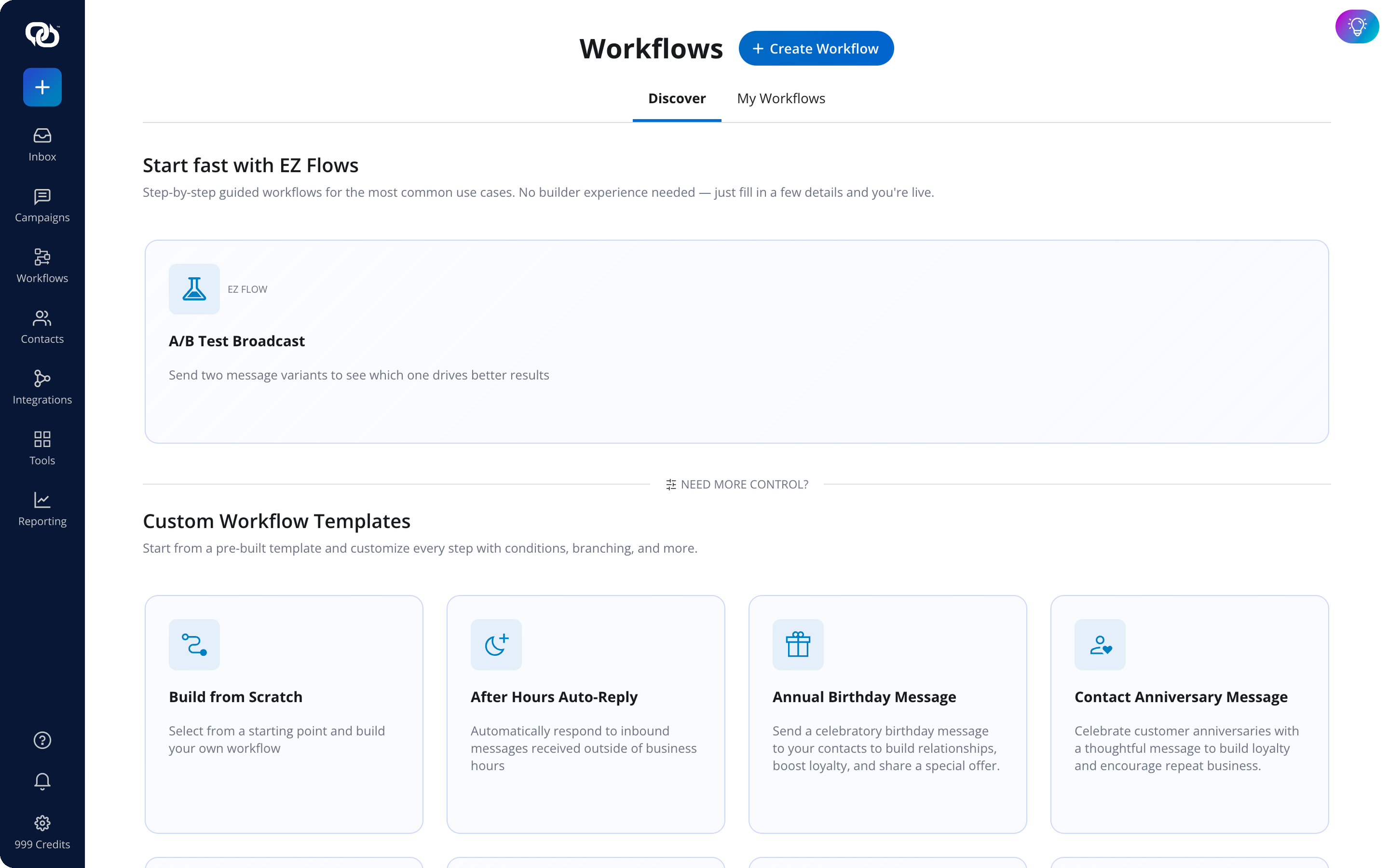
- Visual workflow builder: Create multi-step sequences using triggers, delays, filters, decision branches, and follow-up actions.
- Shopify abandoned-cart automation: Detect qualifying abandoned carts, confirm that the shopper has provided SMS consent, and insert an individual cart link into the recovery message.
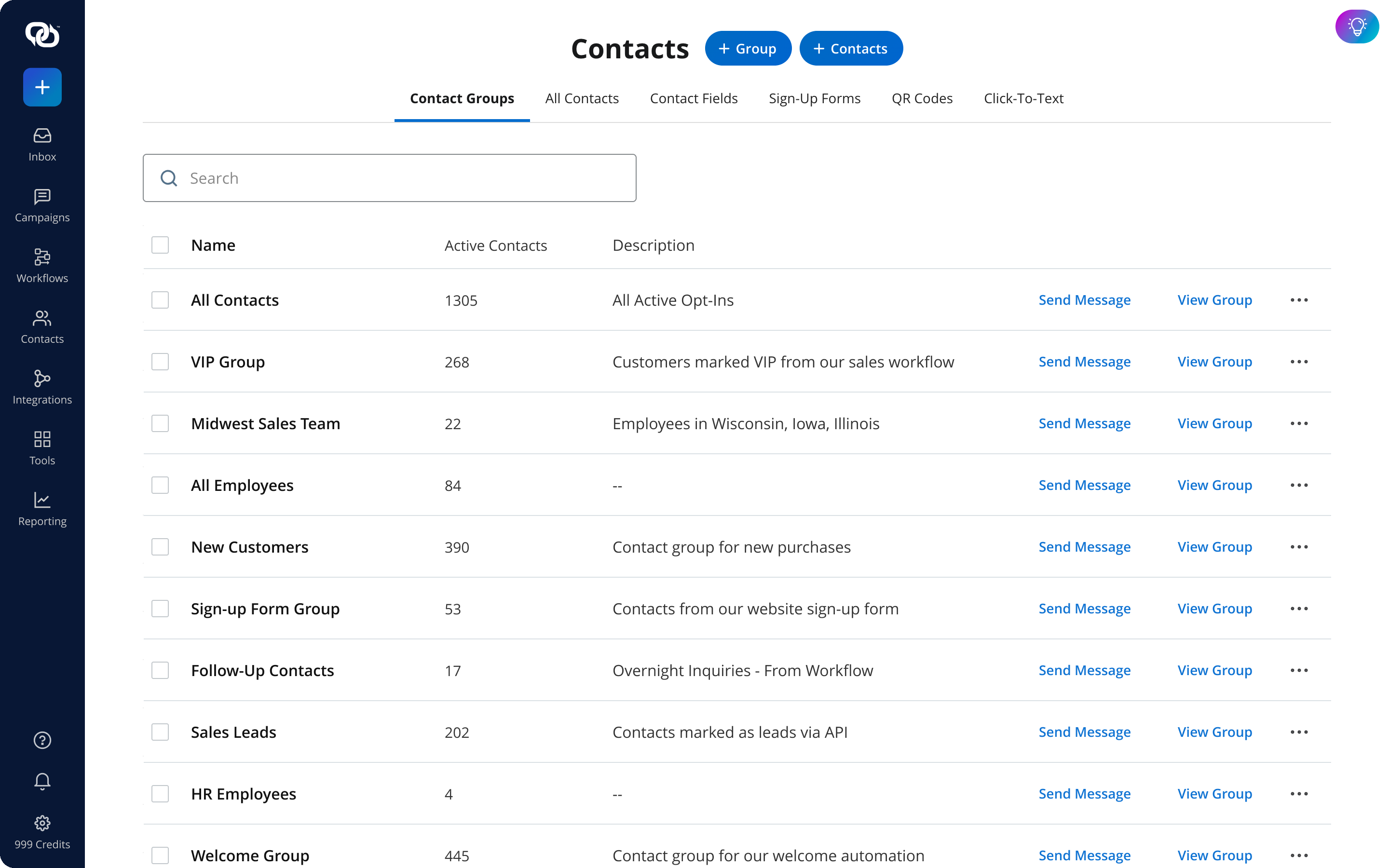
- Contact segmentation: Organize subscribers according to customer data, purchase activity, and other relevant criteria so each workflow reaches the appropriate audience.
- Automated replies: Set up responses for common customer actions or questions while directing more complex conversations to your team.
- Compliance support: Manage opt-in records and process opt-out requests across active campaigns and workflows.
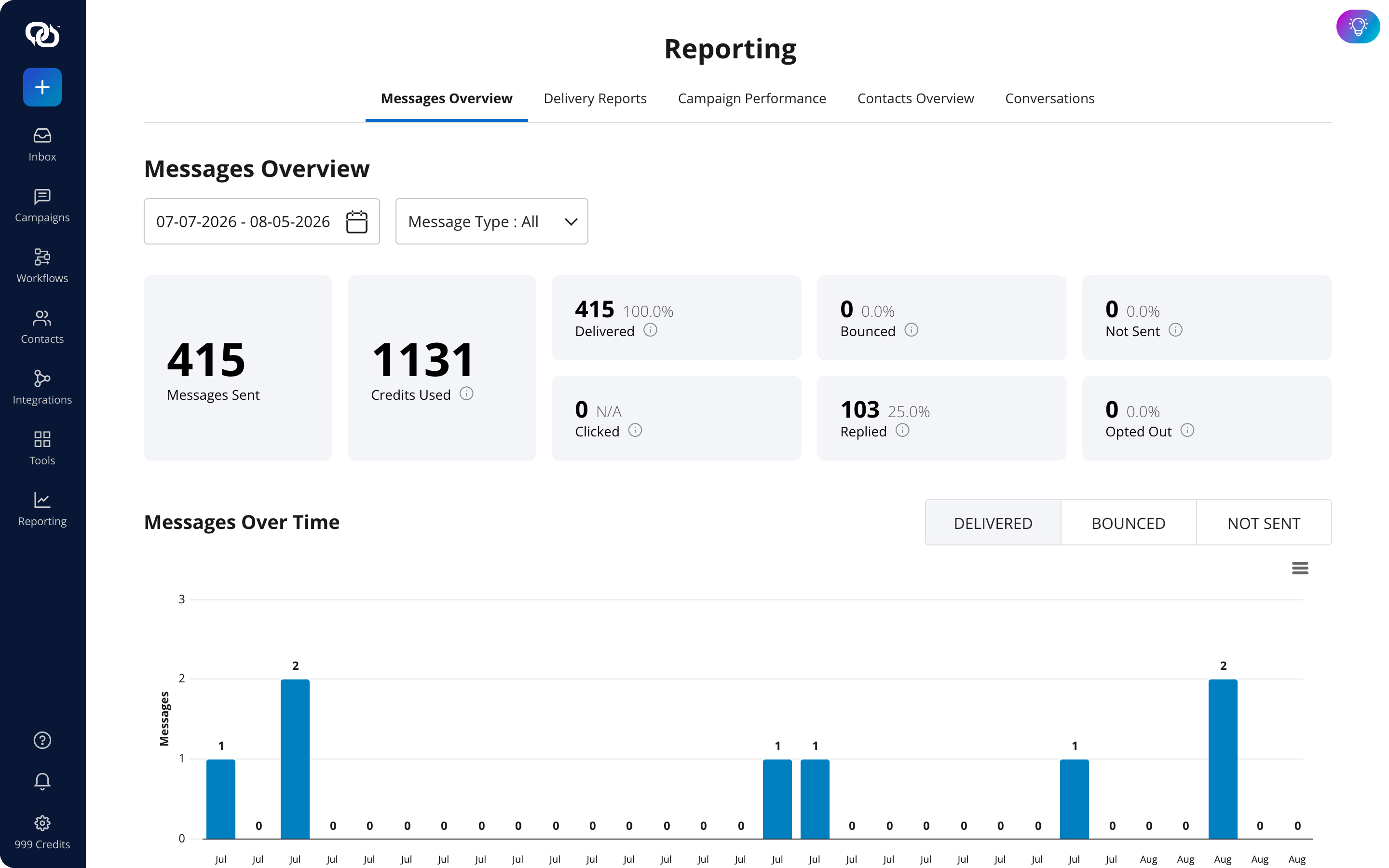
- Performance reporting: Monitor clicks, responses, opt-outs, list growth, and other activity to identify where a sequence may need adjustment.
Every customer is different, and with EZ Texting, your SMS eCommerce strategies can adapt to those individual behaviors, preferences, and purchase patterns. Start your free trial with EZ Texting and build your first automated eCommerce SMS flow.
Frequently Asked Questions About SMS Marketing Automation Strategies for eCommerce
Most eCommerce businesses should begin with a welcome series, abandoned-cart recovery, and post-purchase notifications. These flows address new subscriber conversion, incomplete purchases, and customer communication after an order. Once they are working reliably, you can add win-back, replenishment, review-request, and loyalty automations.
Yes. Shopify stores can use SMS marketing platforms and compatible integrations to initiate messages based on customer activity. Depending on the tools you use, triggers may include abandoned carts, incomplete checkouts, product browsing, purchases, shipping updates, and back-in-stock events.
Yes. Automated promotional workflows should only include customers who have provided the required consent. Your signup process should clearly explain the messaging program, and customers must be able to revoke consent or opt out of future texts. Because requirements vary by jurisdiction and message type, businesses should obtain legal guidance for their specific programs.
Use frequency caps, exit conditions, and suppression rules across your workflows. Remove customers from cart recovery after they purchase, prevent overlapping promotions, and prioritize requested service messages over marketing texts. Reviewing opt-out rates and conversion data can also show when a flow is sending too often or reaching the wrong segment.
See other related to Features:
See other related to Use Cases:
See other related to Topics: