Business Messaging Platform: How to Choose the Right One and Why EZ Texting Leads the WayView as Markdown
A business messaging platform affects how fast you launch and how easily you manage SMS. Here is what to look for, how the top platforms compare, and why EZ Texting leads for small business.
- The business messaging platform you choose affects how fast you can launch and how easily you manage SMS as your program grows.
- Compare the capabilities that matter: ease of use and speed to launch, compliance and opt-out automation, two-way inbox, triggered workflows, analytics, and integrations.
- For small and midsize businesses, EZ Texting is the best overall choice: a complete SMS toolset with built-in compliance and a path to launch in a session or two.
- Other platforms fit specific niches: Klaviyo for combined email and SMS, Postscript for high-volume Shopify, SimpleTexting for nonprofits, and Attentive for enterprise retail.
- Real EZ Texting results span industries: Aeroflow Healthcare (30% revenue growth), Brian's Place (tripled sales), Five Tier (10X return), and Charleston Animal Society ($2M raised).
What Is a Business Messaging Platform?
You know you need a reliable way to reach customers, but choosing a business messaging platform can feel overwhelming for an already-busy team. For most small and midsize businesses, the core questions are simple: how quickly can you start texting customers, and how much work will it take to manage once you do?
The right platform handles the technical pieces behind business texting and gives you straightforward tools to manage contacts, conversations, and campaigns. Here is what to look for, and how EZ Texting approaches the job.
A business messaging platform is software for sending, receiving, and managing text messages with customers at scale. One system manages contacts, sends campaigns, handles replies, and tracks message performance across a large volume of recipients.
The platform sends through a registered business sender and supports bulk messaging, opt-in and opt-out management, automated campaigns, and customer segmentation. Two-way messaging tools also bring customer replies into a centralized inbox, so conversations land in one place instead of on individual devices.
EZ Texting is built specifically for small and midsize businesses that need these capabilities without a lengthy technical setup. You can manage promotional campaigns and customer conversations in the same platform, then add automation or more targeted messaging as your SMS program develops.
What to Look for in a Business Messaging Platform
Feature lists can make business messaging platforms look more alike than they really are. Focus your comparison on the capabilities that affect how easily you can launch, manage customer communication, stay compliant, and improve results over time.
Ease of Use and Speed to Launch
A platform works against you if your staff needs extensive training or ongoing IT support to operate it. Small and midsize businesses should be able to create campaigns, manage contacts, and handle replies without relying on a technical specialist. Pay attention to onboarding, too: a good platform guides you through the essential setup steps so you can reach your first campaign in a session or two.
Compliance and Opt-Out Automation
SMS marketing comes with consent and opt-out requirements that get hard to manage manually as your list grows. Your platform should handle routine compliance tasks such as recognizing standard opt-out keywords, removing opted-out contacts from future sends, and maintaining records of subscriber consent.
Look closely at how those protections work in practice. If opt-outs require manual updates or consent records are hard to retrieve, a simple mistake can send a message to someone who already withdrew permission. Built-in compliance tools apply the same safeguards across every campaign while keeping the records you may need if a complaint arises.
Two-Way Messaging and Inbox Management
Customers like the chance to reply to your texts: to confirm an appointment, ask about a promotion, request more information, or respond to a sales follow-up. A strong platform makes that easy with two-way texting. A centralized inbox keeps each customer's history in one place so whoever responds has context, message routing directs questions to the right staff member, and automated keyword responses handle common requests immediately.
Automation and Triggered Workflows
Automation lets you decide in advance what message goes out when a customer takes an action or reaches a point in their relationship with your business. A new subscriber can get a welcome message right away, and a booked customer can automatically get an appointment reminder as the date approaches. Other common automations include abandoned-cart messages, post-purchase follow-ups, birthday offers, and re-engagement campaigns. Once these sequences are set, the platform handles the timing for each customer.
Analytics and Performance Tracking
Campaign results tell you what to adjust next when you have the data to analyze. A platform can track delivery rate, clicks, responses, and opt-outs so you can see how people reacted to each send, and when revenue tracking is available, you can connect SMS activity to purchases. Individual campaign reports help you compare messages, offers, and timing, while analytics across many campaigns reveal longer-term patterns in what earns engagement.
Integrations with Existing Tools
Your SMS platform can act on information already captured elsewhere in your business. Integrations with your CRM, eCommerce store, or marketing tools can trigger messages based on real activity, such as a new lead entering your CRM or a shopper leaving items in a cart. Connected systems also keep contact information and messaging permissions current, so an opt-out reflects across integrated tools. When comparing platforms, check which integrations are available and how much data they actually share.
The Best Business Messaging Platforms for Small and Midsize Businesses
The right platform depends on what you plan to do with SMS, the tools you already use, how much complexity your business can realistically manage, and your budget.
1. EZ Texting: Best Overall Business Messaging Platform for Small and Midsize Businesses
EZ Texting is built around the needs of small and midsize businesses, with a straightforward interface and the features to run a complete SMS program. You can launch bulk SMS and MMS campaigns, manage replies through two-way texting, capture subscribers with SMS keywords, and organize contacts into targeted groups. It also supports automation, built-in compliance tools, contact management, and performance reporting, so you can start simple and add sophistication as your program grows.
EZ Texting customers have put those capabilities to work across very different businesses. Aeroflow Healthcare reported 30% revenue growth tied to automated patient communication, Brian's Place tripled sales through its VIP text club, Five Tier reported a 10X return on its text campaigns, and Charleston Animal Society reached a $2 million fundraising milestone with SMS central to donor outreach. Flexible plans let businesses adjust usage as their lists and needs change, and new users can try the platform before committing to a paid plan.
2. Klaviyo: Best for eCommerce Businesses Running Combined Email and SMS
Klaviyo is a strong fit for eCommerce businesses that want to coordinate SMS and email in one platform. Its Shopify integration connects messaging to customer activity, and behavior-based segmentation plus pre-built automations support common eCommerce campaigns like cart recovery and post-purchase outreach. It suits businesses already using Klaviyo for email. Businesses with SMS as their primary focus may prefer a dedicated texting platform with features and pricing built around business messaging.
3. Postscript: Best for High-Volume eCommerce SMS
Postscript is built specifically for Shopify brands, with SMS tools geared toward high-volume eCommerce marketing. Businesses can create automated campaigns based on shopping behavior, segment subscribers, and track the revenue their texts generate. That specialization makes it a strong option for established Shopify stores with larger programs. Smaller businesses should compare pricing and expected message volume carefully to see if it fits.
4. SimpleTexting: Best for Nonprofits and Organizations
SimpleTexting leans toward nonprofits, churches, and community organizations that want to run SMS campaigns without a complicated setup. It covers core needs such as mass texting, two-way conversations, and subscriber management. Organizations planning more advanced programs should look closely at automation and integrations when comparing platforms, and weigh which supporter actions should trigger messages and which systems need to share data.
5. Attentive: Best for Enterprise Retail and eCommerce
Attentive is geared toward larger retail and eCommerce brands running high-volume programs, with advanced personalization, AI-powered segmentation, and eCommerce integrations. That enterprise focus comes with greater investment and complexity. Businesses considering Attentive should weigh their subscriber volume, SMS budget, and marketing resources against what they actually plan to use. For many small and midsize businesses, a more accessible platform like EZ Texting covers core SMS needs with a simpler path to launch.
How EZ Texting Works as a Business Messaging Platform
EZ Texting guides you through the core steps of building an SMS program in one interface. You choose your business sender, import existing contacts, create a message, and set up the tools you will use to bring new subscribers onto your list.
For example, SMS keywords let you create an opt-in such as "Text JOIN to 858585." You can promote that keyword on social media, in emails, on store signage, or anywhere customers meet your business, and new subscribers are added to your contact list automatically, ready to organize for future campaigns.
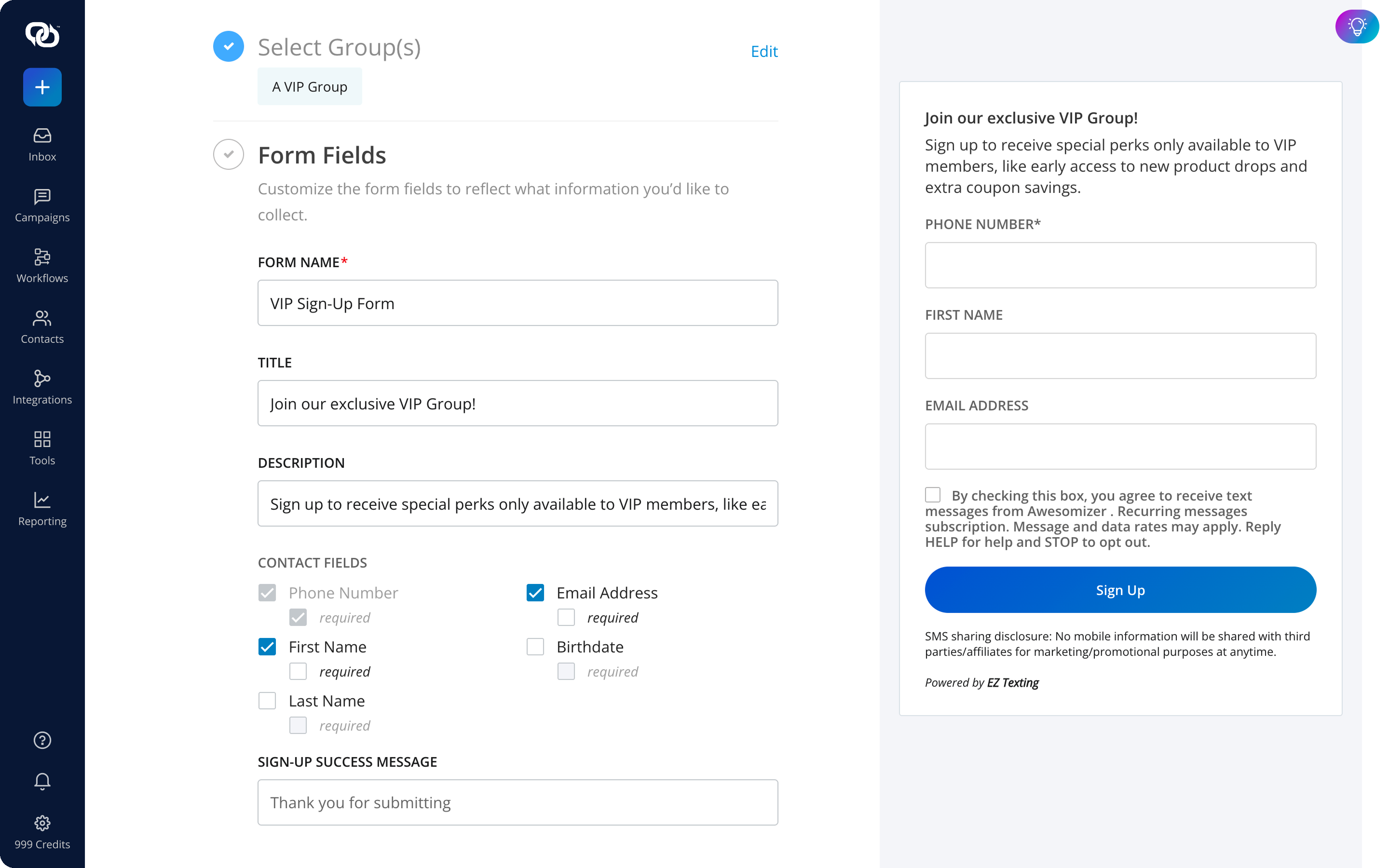
The platform also handles routine compliance tasks such as processing opt-outs and maintaining subscriber records. EZ Texting's compliance infrastructure handles the most critical TCPA requirements automatically, so you never need to manually add opt-out instructions or worry about whether a campaign is scheduled within the permitted quiet-hours window. As campaigns go out, the analytics dashboard shows how your messages perform so you can shape future sends. Everything stays in the same account: campaigns, contacts, automations, replies, and reporting.
How Quickly Can You Get Set Up with EZ Texting?
You can complete much of the EZ Texting setup in a single session. Once you know what you want your first campaign to accomplish, you can import contacts, configure a keyword, create your message, and set up an automated welcome response.
Your sender type has the biggest effect on when you can begin sending. Toll-free numbers, 10DLC numbers, and short codes have different registration and approval processes, so your full launch timeline depends on the option you choose. While registration is underway, you can prepare your contact lists and first campaign, which gives you a head start on the work you control and puts you in position to begin messaging the moment your sender is ready.
Start Messaging Customers the Right Way
For small and midsize businesses, EZ Texting brings the core tools for campaigns, conversations, automation, and compliance into one accessible platform. It has helped businesses across every industry, including healthcare, retail, food service, nonprofit, media, and auctions, achieve measurable results through SMS marketing. Start your free trial and build your first campaign around a goal that matters to your business.
Frequently Asked Questions About Business Messaging Platforms
A business messaging platform supports larger contact lists, registered business senders, campaign management, automation, compliance tools, and performance tracking. It also gives multiple staff members a central place to manage customer messages.
Yes. You can send promotional campaigns and use two-way texting to answer questions, confirm appointments, follow up with leads, or handle other customer conversations.
Start with one clear use case and prepare your contact list before setup. Then choose your sender type, complete registration, and build your first campaign while your sender is being approved.
Many do. SMS works well for text-based messages, while MMS lets you include media such as images and GIFs. Check the platform's MMS capabilities and pricing before choosing a plan.
Platforms can recognize standard opt-out keywords and remove those contacts from future sends. They should also maintain opt-out and consent records so your subscriber data stays current.
Check that the new platform supports your current sender, contact data, integrations, automations, and reporting needs. Plan the migration so subscriber consent and opt-out records carry over accurately.
See other related to Features:
See other related to Use Cases:
See other related to Topics: