Text Marketing for Delivery Updates: Turn Every Shipment Into a Trust-Building TouchpointView as Markdown

Learn how to use text marketing for delivery updates — with templates, best practices, and automation tips to cut support tickets and boost CSAT.


Older customer smiling at a delivery-update text on her phone while holding a package at her front door
Key Takeaways
  • Delivery update texts reduce inbound “where’s my order?” support calls by 40–60%, according to EZ Texting data from shipping and logistics customers.
  • CSAT (customer satisfaction) scores increase by 12–18 points when customers receive proactive SMS updates at key shipment milestones.
  • Among retail apparel and accessories businesses on EZ Texting, transactional messages account for 42.3% of all SMS volume, five times the platform average. Order-stage communication is the dominant use case for product-based businesses.
  • A complete delivery text strategy covers five milestones: order confirmation, shipping confirmation, out-for-delivery alert, delivery confirmation, and delay or exception notice.
  • Automated workflows, triggered by eCommerce and carrier integrations, eliminate manual sends and help ensure every customer gets the right message at the right moment.

Why Delivery Update Texts Outperform Email at Every Stage

Email has its uses, but for time-sensitive delivery or product tracking communication, SMS (texting) is much better suited. The open rates for texts are generally considered to be around 90% up to 98% in some studies, essentially 4 to 5 times higher than the generally accepted email open rate of about 20% to 35%, depending on the source you consult.

Additionally, SMS messaging has a much greater immediacy, since text notifications are typically “on” by default in most devices, and texting is the method by which most people younger than about 50 communicate when near immediate responses are expected or required. Millennials and Gen Z in particular are huge users of texting, and around 74% of millennials rank text messages as their “most used” communication method in their personal life. (And up to 75% of them report being uncomfortable or even experiencing anxiety when they have to actually make phone calls.)

Email also has to fight through email providers’ inbox filters (or those set up by the user, which means fewer emails are even seen at all by the recipient. The click-through rate for texts is far higher than email as well, at about 15–35% for texting as compared to around 2.5% for email, depending on which source you consult.

Additionally, EZ Texting data from shipping and logistics customers shows delivery status texts reduce inbound support calls by 40–60%, freeing up team bandwidth and cutting operational costs while improving the customer experience at the same time. In fact, customers who receive proactive business texting updates report satisfaction score increases of 12–18 points compared to those who receive no milestone notifications.

As mentioned above, email still has a valid and useful role, and is more ideal for record keeping (order receipts, invoices, etc.) but SMS wins where speed and visibility matter most— the moments between purchase and the product being delivered to the customer’s doorstep.

With today’s advanced two-way texting, you provide another layer of value, allowing customers to reply with questions or flag issues without calling support.

SMS wins where speed and visibility matter most—the moments between purchase and the product being delivered to the customer’s doorstep.

The 5 Order and Delivery Texts Every Business Should Send

There are five key milestone messages that any business selling and shipping products should prioritize sending their customers. These are:

  • Order confirmation

    This message should include an order number and provide a rough idea of how long the customer can expect to wait for a shipping notification.

  • Shipping confirmation

    This message is sent when the package is entered into the shipper/carrier’s system, and ideally should include a tracking link.

  • Out-for-delivery alert

    When the package is on the final delivery vehicle and is en route to the customer’s address (also called last-mile logistics), send a text to let the customer know when to expect delivery. This is especially important for items that require confirmation, adult signature, or other delivery validation action on the part of the customer or member of the household.

  • Delivery confirmation

    Once the item has been delivered, send a message confirming delivery and ideally include information about where the package was left (if it didn’t require a signature or other validation). Some text systems allow a photo to be sent depicting the package in its final location at the residence.

  • Delay or exception alert

    When packages are delayed or misrouted, send an update with all relevant information, including the updated ETA and next steps. Note that this delay or exception text is the most trust-critical of all of these messages: silence when something goes wrong is the fastest way to escalate a fixable situation into a lost customer.

Example Delivery Text Templates

Where your system supports it, consider using MMS (Multimedia Messaging Service) for shipping/delivery confirmations where possible and relevant (such as a photo of the package at its final drop location). MMS messages can include images, badges, logos, and even short videos, and can include up to 1,600 characters from any character set. Among retail businesses on EZ Texting, MMS delivery rates (95.4%) outperform standard SMS (90.9%) — meaning visual messages both land more reliably and stand out better.

Here are three helpful ideas/templates just as examples of SMS texts you might send out.

Order ConfirmedThanks for your order from {your_brand}! Order #{order_number} is being prepared. We’ll send another update when it ships. Track your order: {link}

Out for Delivery{your_brand} order #{order_number} is out for delivery with {carrier} and is expected to arrive on {delivery_date}. Track its progress here: {link}

Delay NoticeUpdate from {your_brand}: Delivery of order #{order_number} has been delayed. Your package is now expected to arrive on {delivery_date}. View the latest status: {link}

Best Practices for Delivery Texts That Get Read, Not Ignored

Let’s talk about some practical rules that separate effective delivery text communication from messages that customers tune out or report as spam.

Customize each message:Ideally, every delivery text should open with your brand name so customers recognize the sender immediately. Depending on your CMS platform or your SMS messaging system, you will need to either enclose these fields in square brackets (e.g., [your_brand]) or single or even double curly braces (e.g., {your_brand} or {{your_brand}}). The same goes for the fields for the order number, customer name, and other details in the example texts above.

It’s important to comply with opt-in and opt-out requests: Only send messages to customers who have consented to receive marketing communication or order updates. Be sure to include opt-out instructions in early messages to maintain compliance. Platforms like EZ Texting automate this so nothing slips through.

Consider including links to add value:An effective link strategy can essentially extend the allowable length of the message, which is especially important for customers whose devices default to lower SMS character limits. By including an abbreviated link, you can provide current and potential customers the way to get to delivery tracking pages, customer support options, delivery rescheduling and more, all without overloading the text itself. If you choose to include a link in your SMS message, double check that the link destination is mobile-optimized, since about 90% of texts are read on mobile devices rather than desktops or laptops.

Automate where possible:Generally, mass texting for delivery updates should be automated and triggered by events (such as the order/shipping/delivery status messages above), rather than manually sent in batches. Timing matters and manual sends will never scale effectively.

Keep it brief and relevant:Each delivery update message should be under 160 characters when possible, covering only what changed, what to expect next, and what action (if any) the customer needs to take.

How to Automate Your Delivery Update Flow

Most small businesses today automate SMS delivery via an integration stack: you connect your eCommerce platform (Shopify, WooCommerce, or custom) to a business texting platform, then connect your selected carrier data (UPS, FedEx, USPS, etc.) so shipment events automatically trigger the right messages via your texting platform.

As noted above, you’ll want to configure the appropriate SMS trigger events: order created, label generated, carrier “in transit” scan, out-for-delivery scan, delivered scan, and any exception or delay flag.

Better SMS automation workflows can segment customers by preference. For example, offering a “key updates only” option (shipped, out for delivery, delivered) vs. full tracking notifications at every touchpoint or scan along the way. This allows customers to decide how many notifications they get during the process, and helps prevent annoying customers with too many unwanted messages.

Additionally, two way texting/reply routing allows customers to text back “MISSING” or “HELP” and those replies can land in a shared inbox so support staff can respond without the customer needing to look up a phone number and call.

Setting up your SMS delivery automation requires one-time integration effort, but afterward it runs without manual input. So the investment can be thought of as front-loaded, while the ongoing value compounds the longer the process continues.

How EZ Texting Makes Delivery Texting Simple

EZ Texting

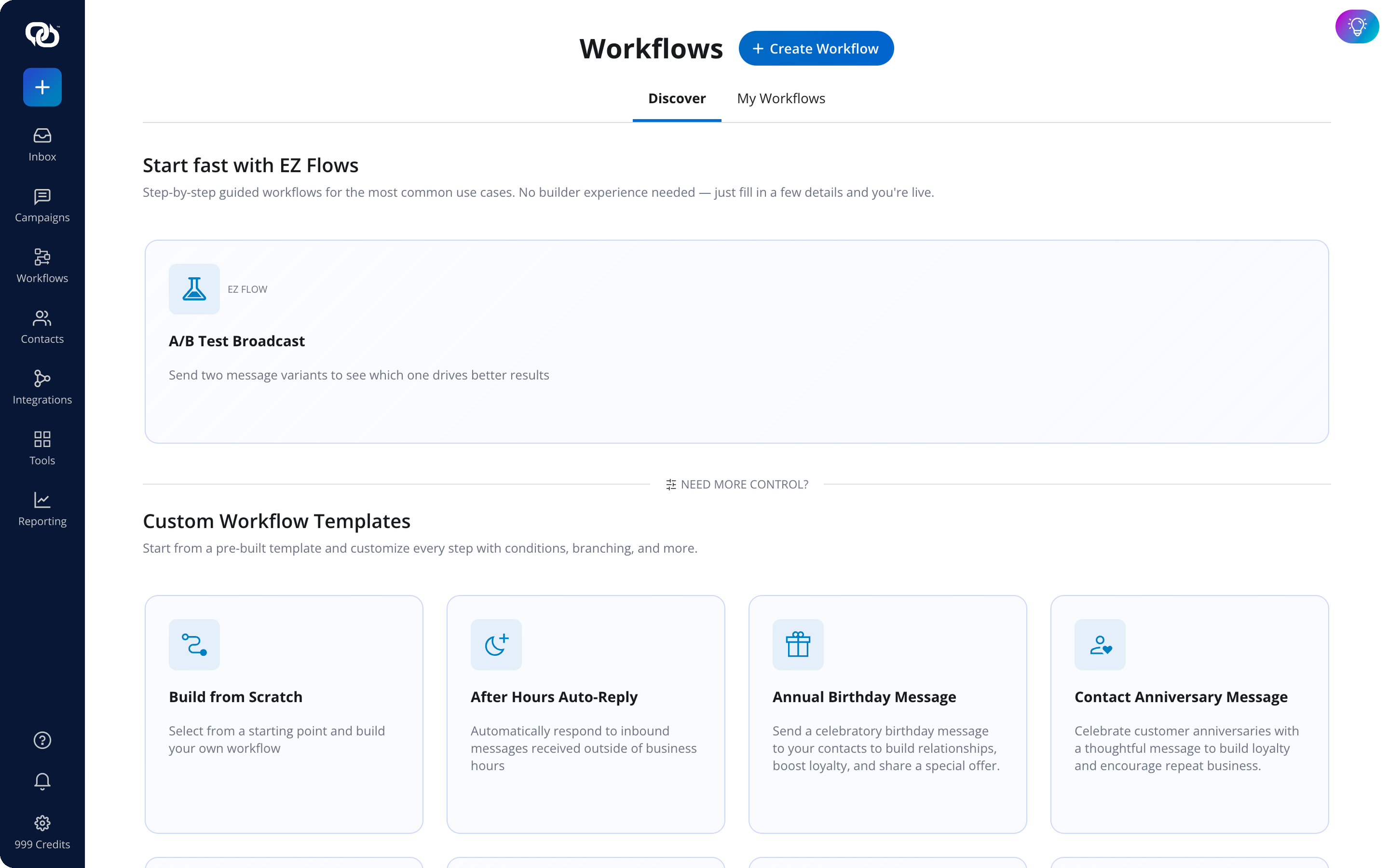
EZ Texting’s workflow builder supports event-triggered messages, so delivery milestone texts fire automatically when carrier status updates (without anyone needing to hit send).

EZ Texting

EZ Texting’s two-way inbox keeps all customer replies organized so support teams can respond to “I didn’t receive my package” messages from a single, shared view.

EZ Texting’s contact segmentation lets businesses send different update flows to wholesale vs. retail customers, or to customers who opted in for all updates vs. key milestones only.

EZ Texting handles opt-in and opt-out compliance automatically, so businesses don’t have to manage TCPA requirements manually.

If you’re ready for your business to move from manual or ineffective delivery/tracking emails to automated, trackable SMS workflows, start your free trial and discover what EZ Texting can do for you.
Frequently Asked Questions About Delivery Update Texts

In many regions, transactional delivery updates can be sent without separate marketing consent because they provide information about an existing purchase. However, businesses should follow applicable laws and carrier requirements, clearly distinguish transactional messages from promotional content and obtain any required consent based on the jurisdiction in which they operate. When customers get unwanted or unexpected messages they may be upset with the sender, even if it’s in reference to a product they purchased. It’s always best to use clear opt-in and opt-out protocols.

A transactional text provides information related to an existing transaction, such as order confirmations, shipping notifications or delivery updates. A promotional text is intended to market products, services or special offers and generally requires a higher level of customer consent before it is sent.

If a customer did not explicitly opt in to marketing messages, businesses should limit communications to essential transactional updates when permitted by applicable regulations. Delivery notifications should remain focused on the order and should not include promotional content unless the customer has separately consented to receive marketing messages.

Businesses should monitor replies and respond promptly to questions about delivery status, scheduling or order issues. Automated responses can address common inquiries, while more complex requests should be routed to a customer service representative to ensure timely resolution.

The appropriate number depends on the shipment and customer expectations, but most businesses only send messages at key milestones, such as order confirmation, shipment, out for delivery and successful delivery. Sending unnecessary updates can frustrate customers and increase opt out rates.

Yes, but international messaging requires consideration of country-specific regulations, carrier requirements, language preferences and message formatting. Businesses should also verify destination coverage, delivery reliability and any additional costs before launching an international delivery notification program.

Yes. Delivery text messages can improve communication for both business and consumer shipments. B2B organizations use them to notify receiving teams about shipment status, estimated arrival times and delivery confirmations, helping improve coordination and reduce delays.

Implementation time depends on system integrations, compliance requirements and workflow complexity. Many organizations can launch a basic delivery text program within days, while more advanced implementations that integrate with ecommerce, shipping and customer relationship management systems may take several weeks.

14-DAY FREE TRIAL
Take EZ Texting for a Spin
The easiest way to add SMS to your business. No credit card required.
1,000+ five-star reviews

Join the 230,000+ Who Have Used EZ Texting to Connect with Their Audiences.